Konftel 800 инструкция по эксплуатации
Инструкция по эксплуатации на русском языке предназначена для владельцев Konftel 800. В PDF-документе подробно описаны особенности устройства, его функции и основные правила эксплуатации. Перед тем как начать пользоваться техникой, рекомендуем внимательно ознакомиться с содержанием руководства.
Наш проект MaxPoints позволяет изучать инструкцию без использования какого-либо дополнительного программного обеспечения. С PDF-версией документа вы можете ознакомиться ниже, воспользовавшись постраничной навигацией или оглавлением.
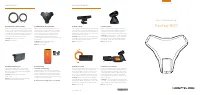
CO N T EN T S
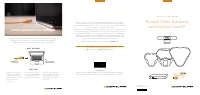
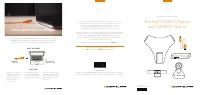
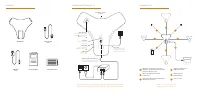
CO N N EC T I O N S A N D S E T U P
CO N N EC T I V I T Y
Audio expansion
Connect Konftel Daisy-chain
Cables
1
or Konftel Smart
Microphones
3
Micro USB
Connect the included
USB cable to laptop
4
Basic setup
Connect the included net-
work cable to an existing
network with PoE support
Optional setup with PoE injector
Connect the included network cable
to Konftel PoE Injector (accessory)
Network
Connect the included
network cable
USB Host
For future use/
accessories
Konftel 800
Network cable
7.5 m
Safety Information
USB cable
1.5 m
Get started guide
AU
DI
O
2
1
Register your product at konftel.com
to get free updates and latest news
For more information, please find installation guide at konftel.com/support/konftel-800
For Zero Touch Installation, please find information at konftel.com/academy/konftel-zti
1
1
1
2
Bluetooth
®
Audio
Expand the coverage by connecting three
Konftel 800 in a daisy chain by use of Konftel
Daisy chain cables (accessory)
Expand the audio pick-up with Konftel Smart
Microphones (accessory)
USB audio for collaboration
(USB cable included)
Built in support for
Konftel Unite app
3
3
4
3
4
2
5
6
6
NFC for quick Bluetooth
®
pairing of
mobile devices
5
L A N
L A N
Kensington
®
security
lock port
Была ли эта инструкция полезной?
Об этой инструкции
- Бренд
- Konftel
- Модель
- 800
- Тип документа
- Инструкция по эксплуатации
- Категория
- Телефон
- Язык(и)
- Русский
- Страницы
- 2
- Размер файла
- 1 MB
- Формат