TP-Link TL-SL1311MP 8x1FE/PoE инструкция по эксплуатации
Инструкция по эксплуатации на русском языке предназначена для владельцев TP-Link TL-SL1311MP 8x1FE/PoE. В PDF-документе подробно описаны особенности устройства, его функции и основные правила эксплуатации. Перед тем как начать пользоваться техникой, рекомендуем внимательно ознакомиться с содержанием руководства.
Наш проект MaxPoints позволяет изучать инструкцию без использования какого-либо дополнительного программного обеспечения. С PDF-версией документа вы можете ознакомиться ниже, воспользовавшись постраничной навигацией или оглавлением.
Installation Guide
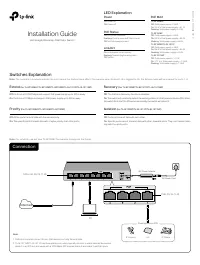
Connection
Unmanaged Desktop PoE/PoE+ Switch
PC
Ethernet Ports (1-8)
PoE Ports (1-4)
1. PoE ports can also connect to non-PoE devices, but only transmit data.
Note:
2. TL-SL1311MP/TL-SL1311P has three uplink ports, which typically connect to uplink devices like routers.
Uplink 1 is an SFP slot and works with a 1000 Mbps SFP module. Uplink 2 and uplink 3 are RJ45 ports.
Internet
Link/Act
On:
Link present but no activity
Flashing:
Transmitting/receiving data
Off:
No link
PoE Status
On:
PoE power provided
Flashing:
Current-overload/ Short-circuit
Off:
No PoE power provided
Power
On:
Power on
Off:
Power off
© 2022 TP
-Link 7106509988 RE
V7.3.1
LED Explanation
DC Power Adapter
AC Power Cord
Switches Explanation
Note:
For simplicity, we will take TL-SF1008P for example throughout the Guide.
Off:
Ports run at 10/100 Mbps and support PoE power supply up to 100 m away.
On:
Ports run at 10 Mbps and support PoE power supply up to 250 m away.
Extend
(for TL-SF1008LP/TL-SF1008P/TL-SF1009P/TL-SL1311P/TL-SL1311MP)
PoE MAX
TL-SF1008LP
Off:
Total power supply < 34 W
On:
34 W ≤ Total power supply < 41 W
Flashing:
Total power supply ≥ 41 W
TL-SF1008P
Off:
Total power supply < 59 W
On:
59 W ≤ Total power supply < 66 W
Flashing:
Total power supply ≥ 66 W
TL-SF1009P/TL-SL1311P
Off:
Total power supply < 58 W
On:
58 W ≤ Total power supply < 65 W
Flashing:
Total power supply ≥ 65 W
TL-SL1311MP
Off:
Total power supply < 117 W
On:
117 W ≤ Total power supply < 124 W
Flashing:
Total power supply ≥ 124 W
Off:
The PoE Auto Recovery function is disabled.
On:
The switch will constantly detect the working status of a PoE powered device (PD). When
the switch finds that the PD works abnormally, the switch will reboot it.
Recovery
(For TL-SF1008P/TL-SL1311P/TL-SL1311MP)
Off:
Ports can transmit data with each other.
On:
Specfic ports cannot transmit data with other downlink ports. They can transmit data
only with the uplink ports.
Isolation
(For TL-SF1009P/TL-SL1311P/TL-SL1311MP)
Off:
All the ports transmit data with the same priority.
On:
The specific ports transmit data with a higher priority than other ports.
Priority
(For TL-SF1008LP/TL-SF1008P/TL-SF1009P)
Note:
The numbers in brackets indicate the ports where the feature takes effect. For example, when Extend(1-4) is toggled to On, the Extend mode will be enabled for ports 1-4.
IP Camera
AP
IP Phone
Powered Device (PD)