VITEK VT-3530 инструкция по эксплуатации
Инструкция по эксплуатации на русском языке предназначена для владельцев VITEK VT-3530. В PDF-документе подробно описаны особенности устройства, его функции и основные правила эксплуатации. Перед тем как начать пользоваться техникой, рекомендуем внимательно ознакомиться с содержанием руководства.
Наш проект MaxPoints позволяет изучать инструкцию без использования какого-либо дополнительного программного обеспечения. С PDF-версией документа вы можете ознакомиться ниже, воспользовавшись постраничной навигацией или оглавлением.
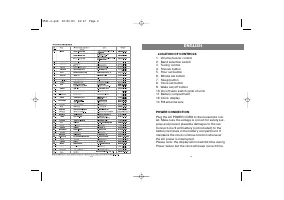
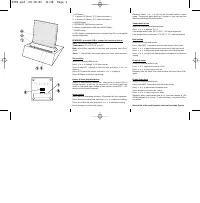
1. SET button
2.
!
button (12/24hour, °C/°F, Start stop button )
3.
"
button (12/24hour, °C/°F, Start stop button )
4. ALARM button
5. RETURN TO TIME function selector
6. Battery compartment: AAA-size (UM-4) Battery
7. RESET button
8. LCD display: to change functions, just press the LCD to change the
display respectively.
FEATURES: press the LCD to change the functions bellow
Time:
12/24-hour alarm clock.
Temperature:
-5° to 50°C/23° to 122°F.
Date:
Month/Day calendar & auto-leap year adjusted from 2000-
2099.
Timer:
1 - 199 minutes countdown timer & 24 hours count-up timer.
Time setting
Press LCD to enter TIME mode.
Press
!
or
"
to change 12/24-hour format.
Press & hold SET 1 second to flash the hour and press
!
or
"
to
adjust it.
Press SET to flash the minute, and press
!
or
"
to adjust it.
Press SET again to confirm the setting.
Return to time display function
Return to time function turned ON - every time you press LCD to
change function, it lasts for 10 seconds for your viewing and then
return to time mode again. Return to time function turned OFF - LCD
remains at the function selected.
Alarm setting
Press Alarm to enter alarm mode for 10 seconds (AL icon displayed).
Press set to flash the minute, and press
!
or
"
to adjust the setting.
Press set to flash the hour, and press
!
or
"
to adjust the setting.
Press set again to confirm the setting.
Remarks: Press
!
or
"
to turn on/off the alarm while in alarm
mode. The pre-set alarm lasts for 1 minute, or you can stop the
alarm by pressing LCD or any button.
Temperature mode
Press LCD to enter Temperature mode.
Press
!
or
"
to change °C or °F.
If the temperature is over 50°C (122°F), "HI" will be displayed.
If the temperature is lower than -5°C (23°F), "LO" will be displayed.
Date setting
Press LCD to enter date mode.
Press & hold SET 1 second to flash the year while in date mode.
Press
!
or
"
to adjust the year and press set to flash the month.
Press
!
or
"
to adjust the month and press set to flash the date.
Press
!
or
"
to adjust the date and press set again to confirm the
setting.
Count-up timer
Press LCD to enter timer mode.
Press
!
or
"
together to reset to 00.00.
Press
!
or
"
to start/stop count-up.
Remarks: after 24 hours, the count-up timer will count from 00.01
again.
Count-down timer
Press LCD to enter timer mode.
Press & hold SET 1 second to flash the timer minute.
Press
!
or
"
to adjust the countdown time.
Press set again to confirm the setting.
Press
!
or
"
to start/stop count-down.
Remarks: when count-down time is up, the timer alarms & LCD
(00.00) flashes for 1 minute. To stop the alarm, just press LCD or
any button.
Service life of the multi-function clock not less than 3 years
3530.qxd 29.10.03 12:28 Page 1