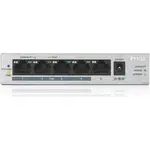
Zyxel GS1005HP-EU0101F инструкция по эксплуатации
Инструкция по эксплуатации на русском языке предназначена для владельцев Zyxel GS1005HP-EU0101F. В PDF-документе подробно описаны особенности устройства, его функции и основные правила эксплуатации. Перед тем как начать пользоваться техникой, рекомендуем внимательно ознакомиться с содержанием руководства.
Наш проект MaxPoints позволяет изучать инструкцию без использования какого-либо дополнительного программного обеспечения. С PDF-версией документа вы можете ознакомиться ниже, воспользовавшись постраничной навигацией или оглавлением.
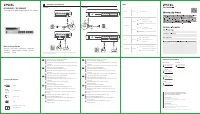
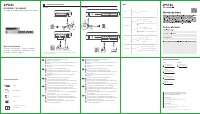
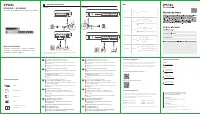
GS1005HP
1
2
POWER
ON
DC 55V
Power Outlet
Modem / Router
PoE
3
4
PoE IP Cam
IP Phone
GS1008HP
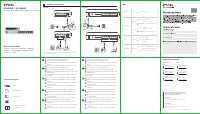
Connect to an appropriate power source.
Set the power switch to the
ON
position.
Connect PoE ports to PoE devices (such as IP Cam and IP
phone).
Connect to a modem or router that has internet access.
An eine geeignete Stromquelle anschließen.
Stellen Sie den Ein/Aus-Schalter in die Position
ON
.
Verbinden Sie PoE Ports mit den PoE Geräten (z.B. IP Cam
und IP Telefon).
An ein Modem oder einen Router mit Internetanschluss
anschließen.
Connectez-vous à une source d'alimentation appropriée.
Mettez l'interrupteur d'alimentation sur la position
ON
(Marche).
Connectez les ports PoE aux appareils PoE (tels que Cam
IP et téléphone IP).
Connectez-vous à un modem ou un routeur ayant accès
à Internet.
Collegare ad una fonte di alimentazione appropriata.
Impostare l'interruttore di alimentazione nella posizione
ON
.
Collegare le porte PoE ai dispositivi PoE (ad esempio IP
Cam e telefono IP).
Connettersi a un modem o router con accesso Internet.
Conecte a una fuente de corriente apropiada.
Coloque el interruptor de corriente en la posición de
encendido.
Conecte los puertos PoE a dispositivos PoE (como IP Cam
o IP phone).
Conectar a un módem o router con acceso a Internet.
1
2
3
4
1
2
3
4
1
2
3
4
1
2
3
4
1
2
3
4
EN
FR
IT
ES
DE
LEDs
Quick Start Guide
ENGLISH | DEUTSCH | FRANÇAIS | ITALIANO
ESPAÑOL | NEDERLANDS | DANSK | NORSK
SVENSKA | SUOMI
GS1005HP / GS1008HP
5-Port/8-Port GbE Unmanaged PoE+ Switch
Connect to an appropriate power source.
Set the power switch to the
ON
position.
Connect PoE ports to PoE devices (such as IP Cam and IP
phone).
Connect to a modem or router that has internet access.
An eine geeignete Stromquelle anschließen.
Stellen Sie den Ein/Aus-Schalter in die Position
ON
.
Verbinden Sie PoE Ports mit den PoE Geräten (z.B. IP Cam
und IP Telefon).
An ein Modem oder einen Router mit Internetanschluss
anschließen.
Connectez-vous à une source d'alimentation appropriée.
Mettez l'interrupteur d'alimentation sur la position
ON
(Marche).
Connectez les ports PoE aux appareils PoE (tels que Cam
IP et téléphone IP).
Connectez-vous à un modem ou un routeur ayant accès
à Internet.
Collegare ad una fonte di alimentazione appropriata.
Impostare l'interruttore di alimentazione nella posizione
ON
.
Collegare le porte PoE ai dispositivi PoE (ad esempio IP
Cam e telefono IP).
Connettersi a un modem o router con accesso Internet.
Conecte a una fuente de corriente apropiada.
Coloque el interruptor de corriente en la posición de
encendido.
Conecte los puertos PoE a dispositivos PoE (como IP Cam
o IP phone).
Conectar a un módem o router con acceso a Internet.
1
2
3
4
1
2
3
4
1
2
3
4
1
2
3
4
1
2
3
4
EN
FR
IT
ES
DE
PWR
Green
On
- Power on
PoE
Green
On
- PoE enabled
Off
- PoE disabled or not
supplied
PoE MAX
Amber
On
- More than 50W supplied
and approaching maximum
Off
- Less than 50W supplied
LINK/ACT
Amber
On
Blinking
- Data transmitting
Green
On
Blinking
- Data transmitting
- 1000 Mbps
connection ready
- 10/100 Mbps
connection ready
Support Information
North America
USA
+ 1 800 255 4101
support@zyxel.com
UK
+ 44 (0) 118 912 1700
support@zyxel.co.uk
Germany
+ 49 (0) 2405 69 09 69
support@zyxel.de
France
+33 (0) 892 692 610
support@zyxel.fr
Spain
+ 34 911 792 100
soporte@zyxel.es
Italy
+ 39 011 2308000
support@zyxel.it
Copyright © 2018 Zyxel Communications Corp. All Rights Reserved.
EU Importer
Zyxel Communications A/S
Gladsaxevej 378, 2. th. 2860 Søborg, Denmark
http://www.zyxel.dk
US Importer
Zyxel Communications, Inc
1130 North Miller Street Anaheim, CA 92806-2001
http://www.us.zyxel.com
See the User's Guide at www.zyxel.com
for more information, including customer
support and safety warnings.
Declaration of Conformity
Safety Warnings
Power Cord
QSG
DoC
Power Adapter
Switch
Package Contents
Hardware Installation
1
* Non-PoE devices can connect to the PoE ports, but PoE power
is not supplied to them.
1
2
POWER
ON
DC 55V
Power Outlet
Modem / Router
PoE
3
4
PoE IP Cam
IP Phone