Netgear GS108LP 8xGE PoE инструкция по эксплуатации
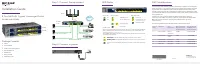
Инструкция по эксплуатации на русском языке предназначена для владельцев Netgear GS108LP 8xGE PoE. В PDF-документе подробно описаны особенности устройства, его функции и основные правила эксплуатации. Перед тем как начать пользоваться техникой, рекомендуем внимательно ознакомиться с содержанием руководства.
Наш проект MaxPoints позволяет изучать инструкцию без использования какого-либо дополнительного программного обеспечения. С PDF-версией документа вы можете ознакомиться ниже, воспользовавшись постраничной навигацией или оглавлением.
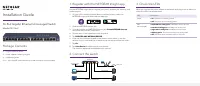
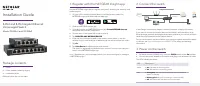
Installation Guide
April 2018
NETGEAR, Inc.
350 East Plumeria Drive
San Jose, CA 95134, USA
8-Port PoE/PoE+ Gigabit Unmanaged Switch
GS108LP and GS108PP
GS108LP
GS108PP
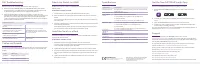
Package Contents
• Switch
• Power adapter
• Power cord (varies by region)
• Wall installation kit
• Rubber feet
• Rack-mount kit
• Installation guide
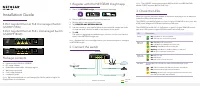
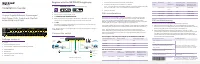
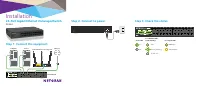
Step 1. Connect the equipment.
Step 2. Connect to power.
GS108LP
switch
Sample connections
Router
Internet
PoE+ security cameras
PoE+ access points
PoE VoIP phone
LED Status
PoE Considerations
The switch prioritizes the PoE and PoE+ power that it supplies in ascending port
order (from port 1 to port 8), with a total power budget of 120 watts. If the power
requirements for the attached powered devices (PDs) exceed the total power
budget of the switch, the PD on the highest-numbered port is disabled to make
sure that the PDs that are connected to the higher-priority, lower-numbered ports
are supported first.
Just because a PD is listed as an 802.3at PoE powered device does not
necessarily mean that it requires the maximum power limit of the specification.
Many PDs require less power, allowing all eight PoE ports to be active
simultaneously.
The following table describes the PoE classes and switch allocations.
Device
Class
Standard
Class
Description
Minimum Power
Allocated to the
Powered Device
Range of Power
Delivered to the
Powered Device
0
PoE and PoE+
Default
power (full)
0.44W
0.44W–12.95W
1
PoE and PoE+
Very low
power
4.0W
0.44W–3.84W
2
PoE and PoE+
Low power
7.0W
3.84W–6.49W
3
PoE and PoE+
Mid power
15.4W
6.49W–12.95W
4
PoE+ only
High power
30.0W
12.95W–25.5W
Power LED
Left Port LEDs
Right PoE LEDs
On
1000 Mbps link
PoE in use
Off
100 or 10 Mbps link
PoE halted (see
)
Activity (blinking)
No PoE use (off)
No link (off)
PoE Max LED
The maximum PoE power that the switch can deliver to all attached powered devices
(PDs) is 120 watts total, with a maximum power to each port of 30 watts. (For more
information, see
)
The PoE Max LED indicates the status of the PoE power that the switch can deliver to
all attached PDs, as follows:
Solid amber
. Less than 7W of PoE power is available on the switch.
Blinking amber
. The PoE Max LED was lit solid in the previous two minutes.
Sufficient (more than 7W of) PoE power is available on the switch (the LED is
off).