Netgear XS508M 7x100M инструкция по эксплуатации
Инструкция по эксплуатации на русском языке предназначена для владельцев Netgear XS508M 7x100M. В PDF-документе подробно описаны особенности устройства, его функции и основные правила эксплуатации. Перед тем как начать пользоваться техникой, рекомендуем внимательно ознакомиться с содержанием руководства.
Наш проект MaxPoints позволяет изучать инструкцию без использования какого-либо дополнительного программного обеспечения. С PDF-версией документа вы можете ознакомиться ниже, воспользовавшись постраничной навигацией или оглавлением.
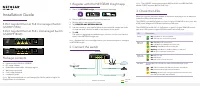
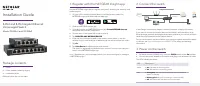
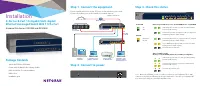
Installation
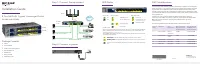
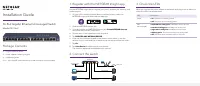
Step 1. Connect the equipment.
Connect an Ethernet port or the SFP port on the switch to your router.
Connect the other ports on the switch to network devices.
5-Port or 8-Port 10-Gigabit/Multi-Gigabit
Ethernet Unmanaged Switch With 1 SFP+ Port
Universal Pro Series XS505M and XS508M
Step 2. Connect to power.
Step 3. Check the status.
Package Contents
• Switch (XS505M or XS508M)
• Power cable (localized to the country of sale)
• Rack-mount kit for rack installation
• Rubber feet
• Installation guide
Power LED
Ethernet port LEDs for ports 1–4 (XS505M) and 1–7 (XS508M)
On
Off
10G link (both port LEDs on). Both port LEDs blinking
indicates traffic activity.
Fan LED
5G link (left port LED off, right port LED on). Right port
LED blinking indicates traffic activity.
Check fan
Normal
2.5G link (left port LED on, right port LED off ). Left port
LED blinking indicates traffic activity.
1G or 100M link (both port LEDs on). Both port LEDs
blinking indicates traffic activity.
No link (both port LEDs off ).
SFP port LEDs (round)
Or, for port 8 (XS508M), Ethernet port LEDs (rectangular)
10G link (both port LEDs on). Both port LEDs blinking
indicates traffic activity.
1G link (both port LEDs on). Both port LEDs blinking
indicates traffic activity.
No link (both port LEDs off ).
Note:
On model XS508M, port 8 is a combo port that lets you establish a 1G or 10G
connection on either the Ethernet RJ-45 port (marked 8) or the SFP+ port (marked 8F).
You cannot use both ports (8
and
8F) simultaneously.
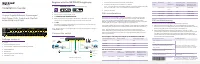
XS508M switch
Sample connections
10G link
to 10 G NAS
Network router
Internet
MS510TXPP switch
10G
fiber link
to switch
2.5G PoE link
to WAC740 AP
2.5G link to 2.5 G
gaming computer
10G link to 10G
computer with a
Thunderbolt port
1G link to
computer